Shopify accounting turns each Shopify payout into correct books, because a USD 12,145 deposit can hide USD 12,400 of sales, USD 395 of fees and USD 890 of sales tax. That deposit is not your revenue. Book it as revenue and profit, tax and margin are all wrong.
Shopify bookkeeping records each piece of every payout. Accounting turns those records into profit, tax and cash decisions. This guide shows the payout entries, the chart of accounts, the software stack and the 2026 tax rules. Think of it as ecommerce bookkeeping built around how Shopify actually pays you.
What Does Shopify Accounting Cover?
Accounting for Shopify stores covers 6 recurring jobs. Each one feeds a number your tax return, your lender or your pricing depends on.
- Payout reconciliation: Split each payout into gross sales, fees, refunds and tax, then match it to the bank deposit.
- Revenue classification: Keep product sales, shipping charged and discounts on separate lines.
- Liabilities: Hold sales tax collected and unredeemed gift cards as money you owe.
- Inventory and cost of goods sold: Track landed cost per unit so gross margin is real.
- Tax compliance: File sales tax where you are registered and reconcile Form 1099-K.
- Reporting: Close the month and read the profit and loss statement, balance sheet and cash flow statement.
Shopify Bookkeeping vs Shopify Accounting
Bookkeeping for Shopify is the recording layer. A Shopify bookkeeper categorizes every payout line, reconciles the clearing accounts and keeps inventory current, mostly weekly.
A Shopify accountant works one level up. The accountant sets your accounting method, reviews margin by product, plans for sales tax nexus and income tax, and signs off on year-end numbers.
Can You Do Accounting in Shopify?
No. Shopify records orders, payments and payouts, but it is not a double-entry ledger. It has no general ledger, no bank reconciliation, no accounts payable and no balance sheet. Shopify small business accounting therefore always runs in two systems: Shopify for sales data, accounting software for the books.
Here is where the line sits:
| Shopify gives you | You still need accounting software for |
|---|---|
| Finance summary and total sales breakdown reports | A double-entry general ledger |
| Payout details, exportable per payout | Bank and credit card reconciliation |
| Sales tax calculated at checkout and a United States sales tax report | Filing and paying sales tax returns |
| Gross profit, if you enter a cost for each product | Inventory valuation, accounts payable and a balance sheet |
Most stores close that gap with QuickBooks Online or Xero plus a connector. If QuickBooks is your ledger, the setup choices are covered in our guide to Shopify QuickBooks integration.
What Changed in Shopify Finance in 2026
Three Shopify changes affect your books in 2026:
- A new Shopify Payments activity report. It sits under Finance, then Documents, and shows starting balance, gross activity, fees, payouts and ending balance for any range from 1 January 2025. Shopify states the Shopify Payments activity report is not a statement of revenue. It also excludes third-party processors and Shopify billing fees.
- New Shopify Tax pricing. Stores created on or after 13 May 2026 get Shopify Tax free until USD 100,000 in lifetime sales. Older stores keep an annual USD 100,000 free threshold.
- Third-party transaction fees on gift cards. For stores created after 12 May 2025, orders paid with store credit or gift cards can carry the third-party transaction fee.
How Shopify Payouts Turn Into Journal Entries
Shopify payouts are batches. One deposit bundles many orders, minus fees, refunds and chargebacks, plus the sales tax and shipping customers paid. Book the batch at gross, then split it.
Timing explains most of the gap. In the United States, Shopify Payments payout timing is a minimum of 3 business days, on a daily, weekly or monthly schedule. Your bank can take another 1 to 3 days. A chargeback comes out of your next available payout, not the payout that held the original sale.
Shopify’s reports also date orders and payments differently. A May order paid in June shows in May sales and June payments. The order report, the payout report and the bank statement can all be right and still disagree.
Worked Example: Booking One Shopify Payments Payout
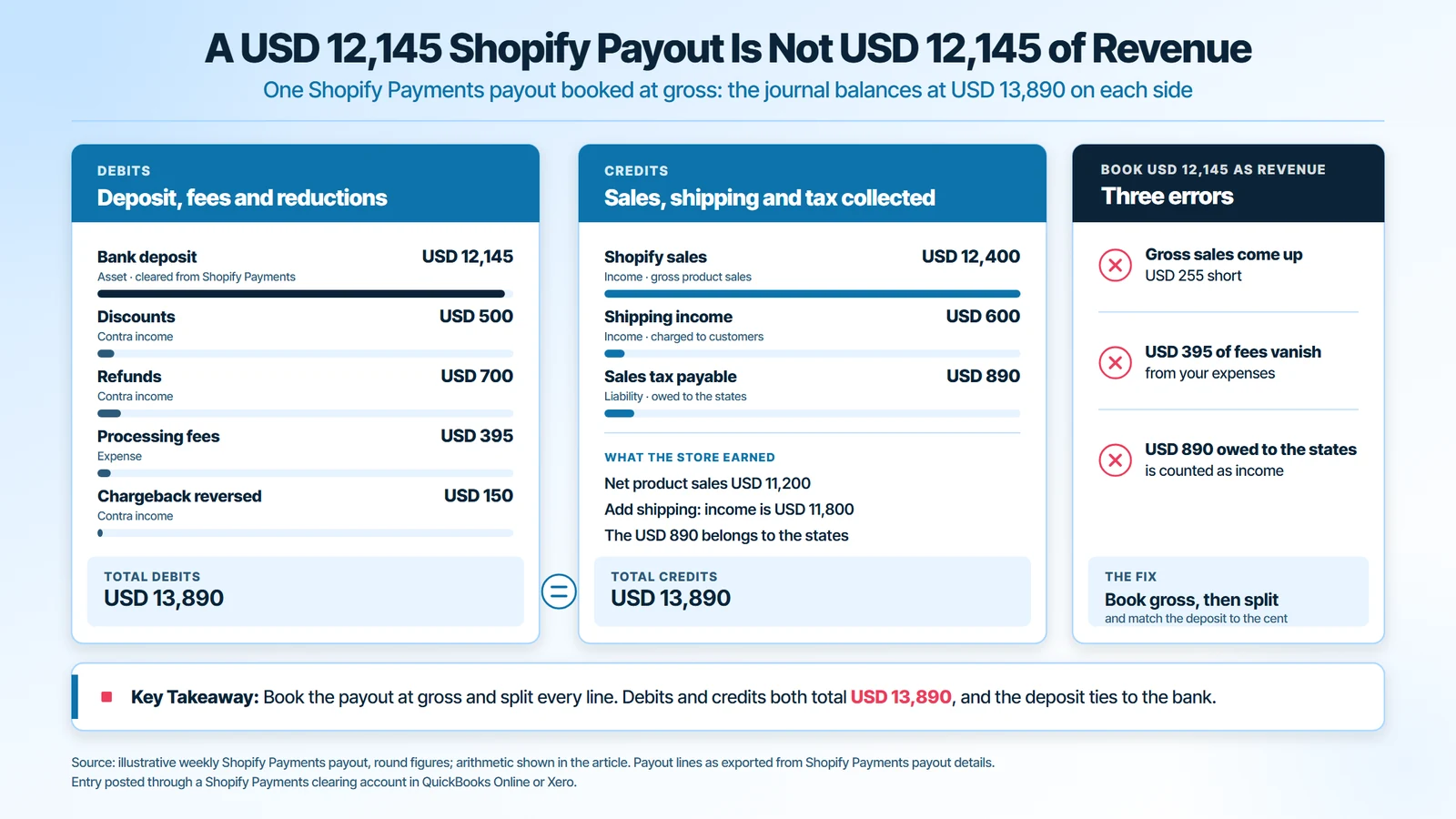
Here is one weekly Shopify Payments payout, line by line. Every figure is illustrative and the arithmetic is shown.
| Payout line | Amount | Account it posts to |
|---|---|---|
| Gross product sales | USD 12,400 | Sales (income) |
| Discounts | minus USD 500 | Discounts (contra income) |
| Refunds | minus USD 700 | Refunds (contra income) |
| Shipping charged to customers | plus USD 600 | Shipping income |
| Sales tax collected | plus USD 890 | Sales tax payable (liability) |
| Processing fees | minus USD 395 | Payment processing fees (expense) |
| Chargeback reversed | minus USD 150 | Chargebacks (contra income) |
| Bank deposit | USD 12,145 | Bank, from the Shopify Payments clearing account |
The deposit is 12,400 minus 500 minus 700 plus 600 plus 890 minus 395 minus 150, which is USD 12,145. Net product sales are USD 11,200. Add shipping and income is USD 11,800. The USD 890 belongs to the states and the USD 395 is an expense.
The journal balances at USD 13,890 on each side. Debits are the deposit, fees, discounts, refunds and chargeback. Credits are sales, shipping income and sales tax payable. Book the USD 12,145 as revenue instead and gross sales drop by USD 255, USD 395 of fees disappear, and USD 890 owed to the states is counted as income.
Why the Shopify Payments Clearing Account Must Hit Zero
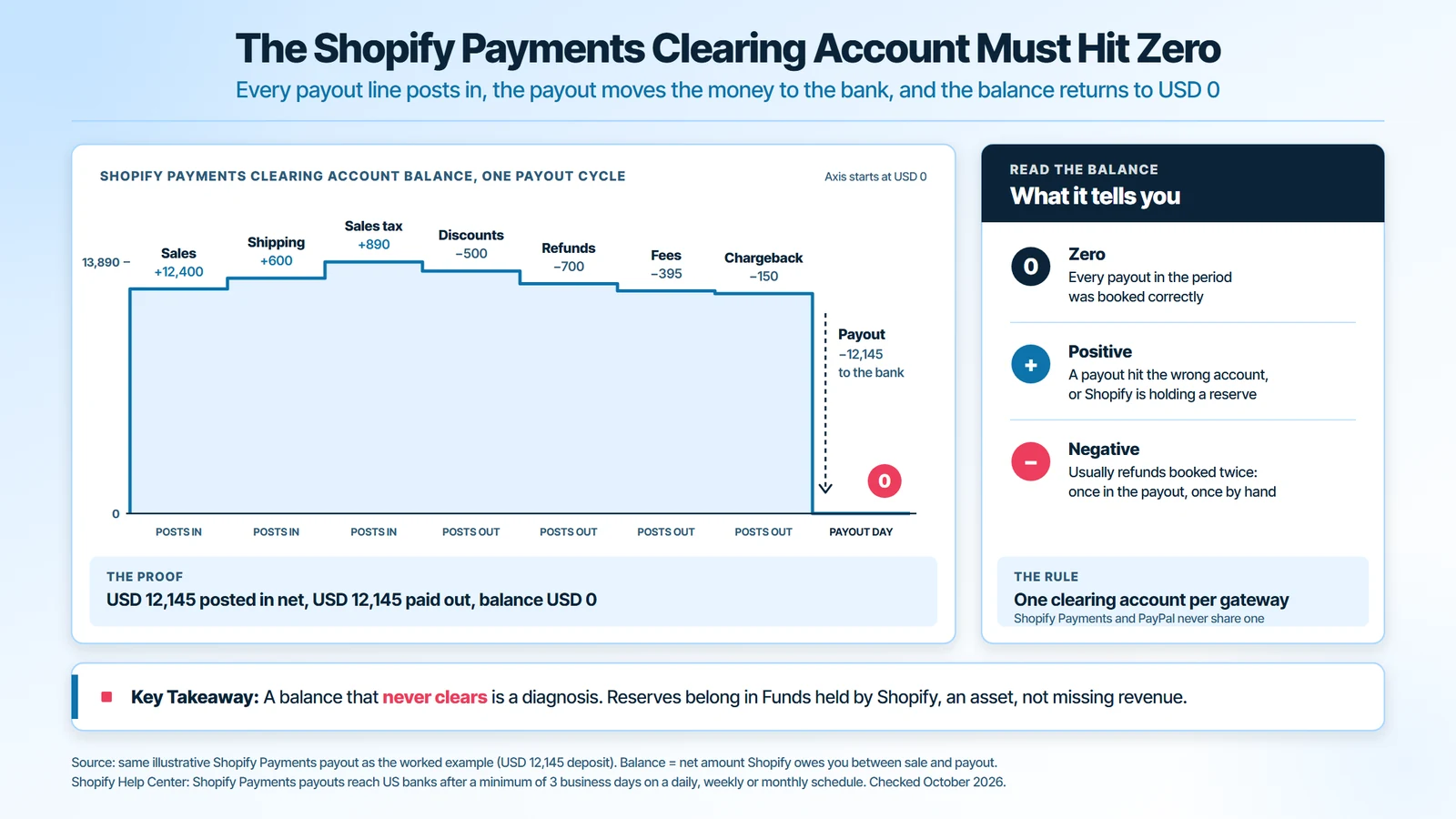
A clearing account is a holding account between Shopify and your bank. Sales post into it when they happen. Each payout moves money out of it to the bank. When every payout is booked correctly, the balance returns to zero.
A balance that never clears is a diagnosis. A positive balance usually means a payout went to the wrong account or a reserve is held. A negative balance usually means refunds were booked twice. Run one clearing account per gateway, so PayPal and Shopify Payments never mix.
Building a Shopify Chart of Accounts That Matches the Payout
Your chart of accounts should mirror the payout, line for line. If a payout line has no account, it gets dumped into sales or fees and the margin breaks. These are the accounts a Shopify store needs before the first sync:
| Account | Type | What posts here |
|---|---|---|
| Shopify sales | Income | Gross product sales at full price |
| Shipping income | Income | Shipping charged to customers |
| Discounts, refunds, chargebacks | Contra income | Each on its own line |
| Sales tax payable | Liability | Tax collected, by state |
| Gift card liability | Liability | Gift cards sold and not yet redeemed |
| Shopify Payments clearing, PayPal clearing | Current asset | Money in transit to the bank |
| Funds held by Shopify | Current asset | Reserves and risk holds |
| Inventory | Current asset | Landed cost of unsold stock |
| Cost of goods sold | Cost of sales | Landed cost of units sold |
| Processing fees, Shopify subscription and apps, Shopify Tax fees, shipping labels | Expense | Separate lines, so each cost is visible |
How to Book Shopify Gift Cards
Shopify’s own finance reports treat a gift card sale as a liability, not a sale. The sale is counted only when the card is redeemed. Your ledger should do the same.
Sell a USD 200 gift card and you credit gift card liability for USD 200. Revenue is zero until the customer spends it. Check the liability against Shopify’s outstanding gift card balance report each month. For income tax, IRS Publication 538 treats certain gift card sales as advance payments eligible for deferral.
Cash or Accrual for a Shopify Store in 2026
Accrual accounting records a sale when it happens and its cost of goods sold in the same month. Cash accounting records money when it moves. For a store holding stock, accrual is the method that shows true margin.
The tax rule gives you a choice. For tax years beginning in 2026, the gross receipts test is a three-year average of USD 32 million or less, under Revenue Procedure 2025-32. A small business taxpayer under that line can skip formal inventories. It can treat inventory as non-incidental materials and supplies, or follow its books.
Choose deliberately, because the method is hard to undo:
- Cash basis fits a store with no stock, one gateway and simple tax needs.
- Accrual fits any store holding inventory, seeking a loan or planning to sell the business.
- Changing later means filing Form 3115 for IRS consent, so set the method before the first return.
How to Set Up Shopify Accounting Step by Step
Set up Shopify accounting once, in these 8 steps, and each later step has clean data to work with.
- Open a dedicated business bank account and card. Every payout and supplier bill runs through them. Mixed personal spending is the first thing that breaks a reconciliation.
- Pick your accounting method. Decide cash or accrual using the rules above. Switching after the first return costs an IRS filing.
- Choose the ledger and the connector together. The connector decides whether a payout arrives as one balanced journal or as thousands of invoices.
- Build the chart of accounts. Create every account in the table above before the first sync. Otherwise the connector posts to default accounts you then have to unpick.
- Connect every gateway. Add Shopify Payments, PayPal and any buy now, pay later provider, each with its own clearing account.
- Turn on sales tax tracking by state. Map collected tax to sales tax payable, with a sub-account per registered state.
- Test one payout by hand. Rebuild a single payout from the Shopify export and compare it with the synced entry. If they differ by even USD 1, fix the mapping before you automate.
- Fix a monthly close date. Pick a day, such as the 10th, and close the prior month on it every month.
Shopify COGS: Tracking Cost of Goods Sold Correctly
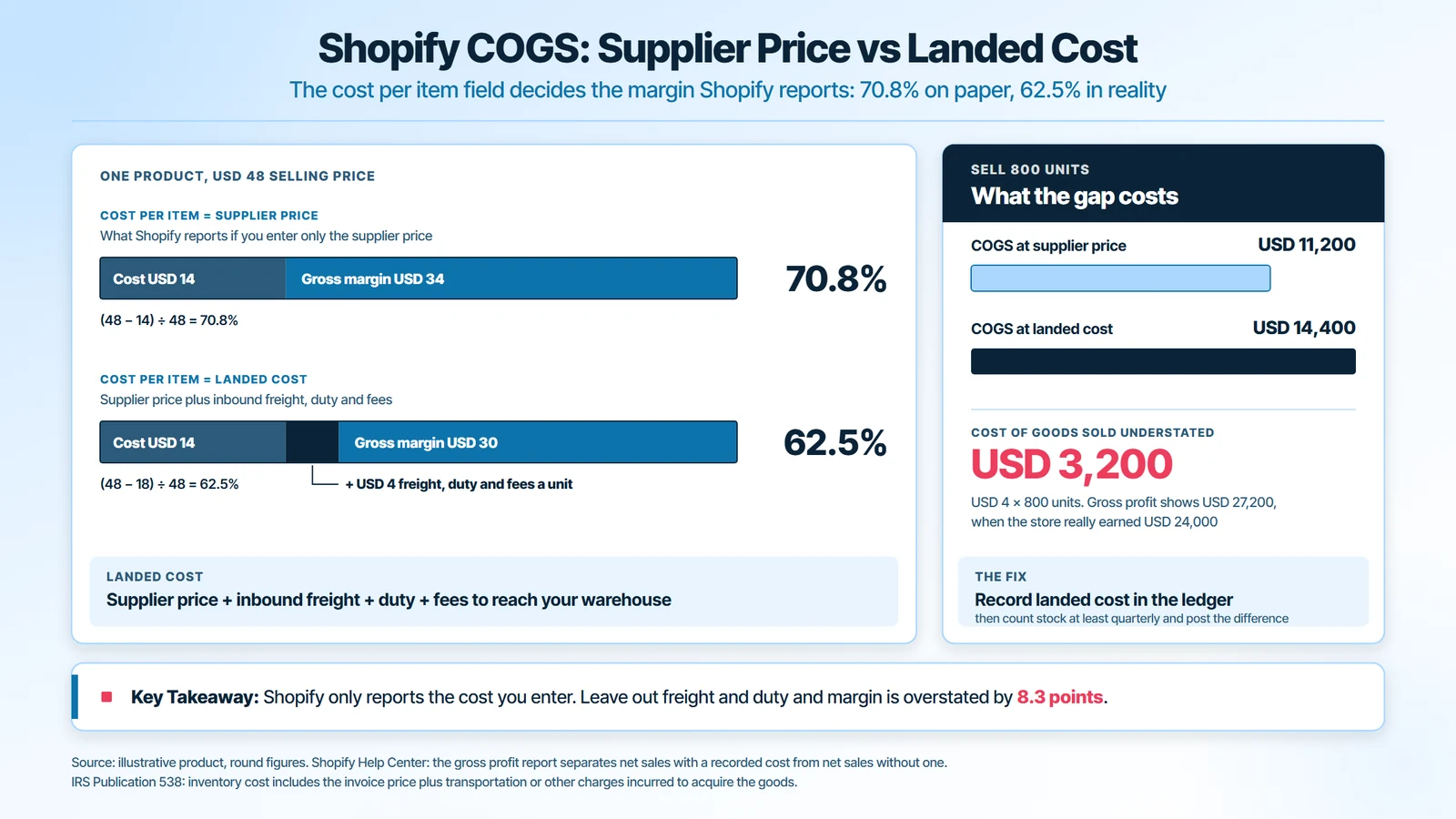
Shopify cost of goods sold is the landed cost of the units you sold. Landed cost means supplier price plus inbound freight, duty and fees to get stock into your warehouse. It is the number gross margin depends on.
Shopify can only report what you give it. Its gross profit report splits net sales with a cost recorded from net sales without one. If the cost per item field holds only the supplier price, Shopify shows a margin your books cannot support.
Here is what that error costs, with illustrative numbers:
- A product sells for USD 48. The supplier price is USD 14, but landed cost is USD 18.
- Margin on supplier price looks like 70.8 percent: (48 minus 14) divided by 48.
- True margin is 62.5 percent: (48 minus 18) divided by 48.
- Sell 800 units and cost of goods sold is understated by USD 3,200: USD 4 times 800.
Record landed cost in your ledger, not just in Shopify. Then count stock at least quarterly and post the difference, so shrinkage and damaged goods do not sit inside inventory.
Shopify Accounting Software and the Connector Layer
Shopify accounting software has 2 parts: the ledger and the connector that feeds it. Choosing accounting software for Shopify means choosing both. QuickBooks Online and Xero are the common ledgers. A2X, for example, describes its app as turning Shopify sales, fees, taxes, refunds and gift cards into summaries that reconcile with deposits.
The claim “connects to Shopify” hides three different products.
Order-Level, Payout-Level and Report-Only Sync
- Order-level sync posts every order as its own invoice. A busy store ends up with thousands of entries a month.
- Payout-level sync posts one summary journal per payout, split into sales, fees, refunds and tax. The USD 12,145 payout above becomes 1 balanced journal that matches the deposit.
- Report-only sync reads Shopify numbers for dashboards and posts nothing to the ledger, so it does nothing for the close.
Which Accounting Software Connects to Shopify Cleanly?
Judge any Shopify accounting app by 5 questions:
- Does it post one journal per payout that ties to the deposit to the cent?
- Does it put sales tax collected into a liability account?
- Does it carry cost of goods sold per product, or only total purchases?
- Does it cover every gateway you run, including PayPal?
- Does it handle a refund or chargeback that lands in a later month than the sale?
A tool that fails the first question costs more in cleanup than it saves. A native app can carry one gateway at low volume. Two gateways, inventory or high volume call for payout-level sync.
How to Set Up Shopify Automated Accounting
To set up Shopify automated accounting, automate the matching and keep people on the judgment calls. These 5 steps take one close to prove.
- Connect the payout feed. Install a payout-level connector and point each gateway at its clearing account.
- Map once. Map every Shopify line, including gift cards, Shopify Tax fees and shipping labels, to the chart of accounts above.
- Add bank rules. Let the ledger auto-match each deposit to the payout journal of the same amount.
- Feed bills automatically. Send supplier invoices and freight bills into the ledger so landed cost reaches inventory.
- Review exceptions weekly. Look only at unmatched deposits, clearing balances that are not zero, and payouts with reserves. Compare the month with the Shopify Payments activity report, which covers any range from 2025 onward.
Automation fails quietly when the mapping is wrong, because it repeats the error on every payout. Re-check the mapping after any new app, gateway or market.
Shopify Sales Tax in Your Books and on Your Returns
Shopify sales tax is a liability you collect for each state, and it never belongs in revenue. Shopify Tax calculates the rate at checkout. Registering, filing and paying the return is still your job.
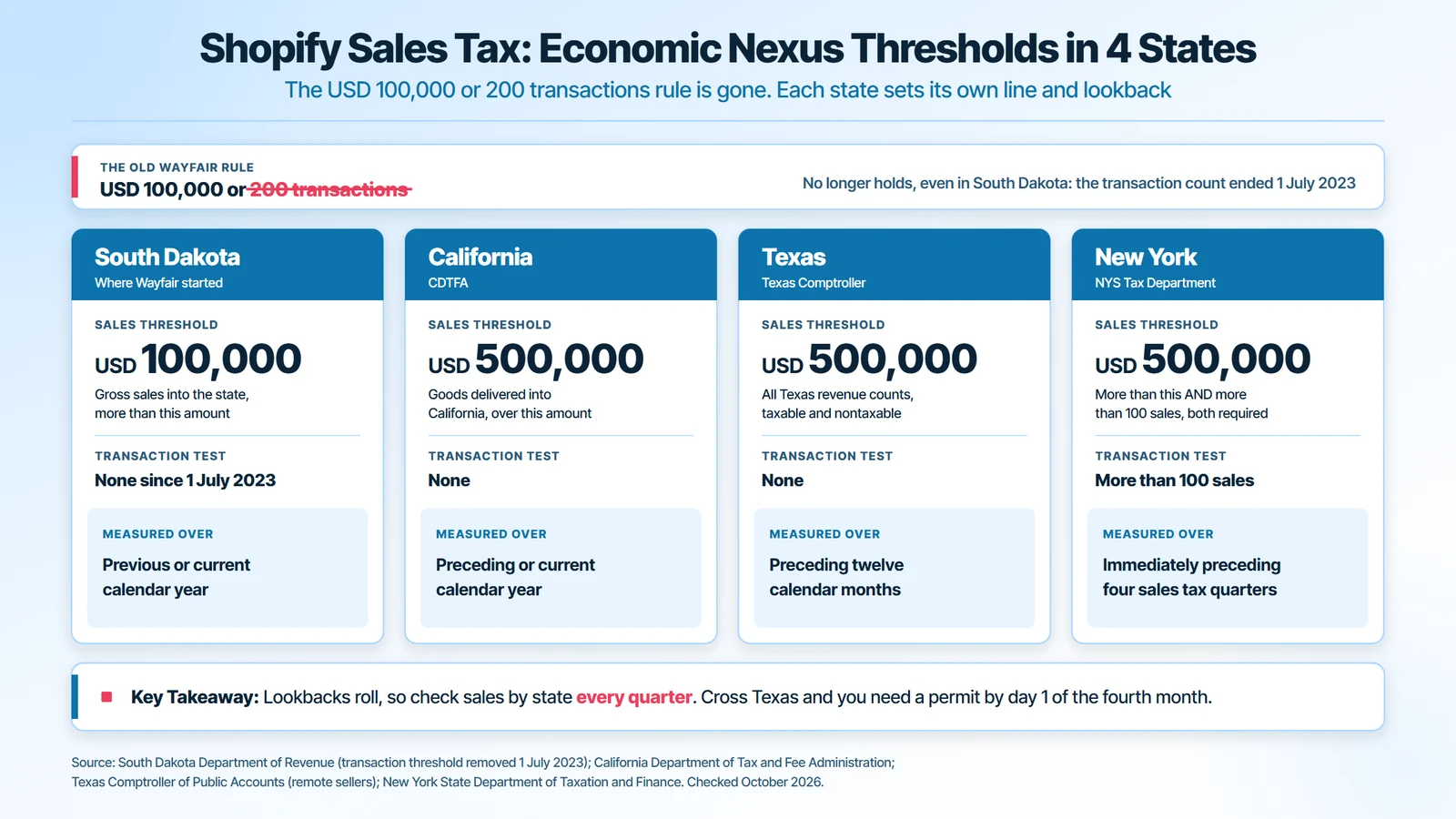
Use Shopify’s United States sales tax report to tie tax collected to sales tax payable each month. Then check where you have economic nexus, which is the sales level that obliges a remote seller to register in a state. Thresholds differ more than most guides admit:
Economic Nexus Thresholds in Four Benchmark States
| State | Threshold | Measured over |
|---|---|---|
| South Dakota | More than USD 100,000 in gross sales. The 200-transaction test ended 1 July 2023 | Previous or current calendar year |
| California | Sales of goods delivered into the state over USD 500,000, no transaction test | Preceding or current calendar year |
| Texas | USD 500,000 of total Texas revenue, taxable and nontaxable | Preceding twelve calendar months |
| New York | More than USD 500,000 and more than 100 sales, both required | Immediately preceding four sales tax quarters |
The original Wayfair rule of USD 100,000 or 200 transactions no longer holds even in South Dakota. The South Dakota Department of Revenue confirms the transaction count was dropped in 2023. California’s rule comes from the California Department of Tax and Fee Administration.
Texas counts nontaxable sales toward its line, per the Texas Comptroller. Cross it and you must hold a permit by the first day of the fourth month after. New York’s two-part test is set out by the New York State Department of Taxation and Finance. Lookbacks roll, so check them every quarter.
How to Avoid Shopify Tax Transaction Fees?
Shopify Tax charges a fee once you pass its free threshold, and you cut it legally by collecting only where you must. Under Shopify Tax pricing, the fee is 0.35 percent of United States orders where tax is collected, or 0.25 percent on Shopify Plus. It is capped at USD 0.99 per order.
Here is how to keep the fee down without breaking a tax rule:
- Collect only in registered states. The fee applies only where tax collection is switched on. Turning on collection where you have no nexus costs a fee and creates tax you must then file.
- Never switch collection off where you are registered. The fee is far smaller than uncollected tax you would owe from your own margin.
- Avoid the separate third-party transaction fee. Orders through Shopify Payments, Shop Pay and Shop Pay Installments do not carry it.
- Book both as expenses. Post Shopify Tax fees and transaction fees to their own expense lines, never against sales tax payable.
Shopify and Form 1099-K: What the IRS Receives
Shopify Payments and other payment platforms report your gross payments to the IRS on Form 1099-K. Payment apps and marketplaces must file when payments exceed USD 20,000 across more than 200 transactions. The IRS confirmed that the One, Big, Beautiful Bill restored this line retroactively.
The scope matters more than the number. The USD 20,000 test is an exception written for third party settlement organizations. The Form 1099-K instructions give payment card transactions no such minimum. So a store can receive a form below the line, and each platform you use can send its own.
Three rules govern the Shopify 1099-K:
- It reports gross. The amount ignores refunds, fees, discounts and shipping, so it will always exceed your net sales.
- It shows each month. The form carries a gross figure for every month, so reconcile it month by month, not just in total.
- No form still means tax. A store with USD 15,000 in sales may get no form and still reports every dollar of income.
Reconciling a Shopify 1099-K to Your Books
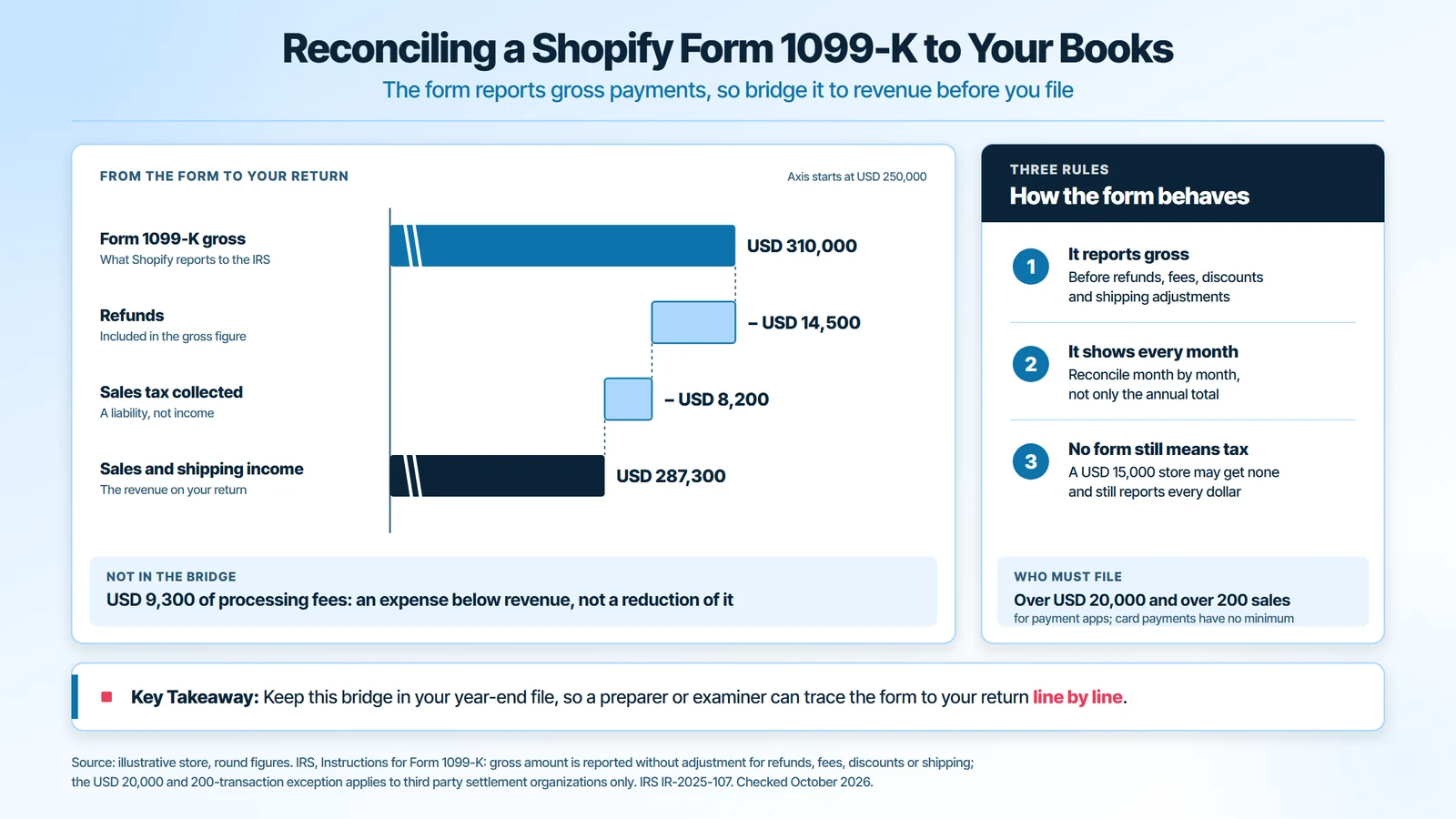
Say the form shows USD 310,000. Inside that gross sit USD 14,500 of refunds and USD 8,200 of sales tax collected. Your sales and shipping income is 310,000 minus 14,500 minus 8,200, which is USD 287,300.
The USD 9,300 of processing fees is not subtracted here. It sits below revenue as an expense. Keep this bridge in your year-end file, so a tax preparer or examiner can trace the form to your return line by line.
Shopify Accounting Reports to Read Every Month
Shopify accounting reports come from 2 places: Shopify’s finance reports and your ledger. Shopify shows what happened in the store. The ledger shows what it means for profit, cash and tax. Read these 6 each month:
| Report | Where | What to check |
|---|---|---|
| Total sales breakdown | Shopify | Gross sales, discounts, returns, shipping and tax agree with the ledger |
| Payments by gateway | Shopify | Each gateway ties to its clearing account |
| Outstanding gift card balance | Shopify | Equals the gift card liability account |
| Profit and loss statement | Ledger | Gross margin by month and refund rate |
| Balance sheet | Ledger | Clearing accounts at zero, tax payable matches returns, inventory matches the count |
| Cash flow statement | Ledger | Cash tied up in inventory and reserves |
Add contribution margin per channel once you sell in more than one place. It shows which channel pays for its own fees, shipping and ads. Then compare refunds with gross sales: in the payout above, USD 700 of refunds against USD 12,400 of sales is a 5.6 percent refund rate.
Shopify Accounting Mistakes That Distort Profit
Most broken Shopify books fail in the same 7 places. Each is cheap to fix in month one and expensive by year end.
- Booking the deposit as revenue. It hides fees and refunds. In the payout above, USD 395 of fees vanish from view.
- Counting sales tax as income. Profit looks higher, and you pay income tax on money you owe a state.
- Booking gift cards as sales. Revenue arrives early and the liability disappears.
- Using supplier price as cost. Margin is overstated by the freight and duty left out.
- Running all gateways through one account. PayPal and Shopify Payments settle on different schedules, so a mixed account never clears.
- Ignoring reserves. Funds held by Shopify are your asset, not missing revenue.
- Letting months pile up. Three open months take an afternoon. Nine take a rebuild from bank statements.
Month-End Close Checklist for Shopify Stores

Good Shopify accounting practices come down to one repeatable close. Run these 8 checks on the same day every month:
- Reconcile every payout in the month to its bank deposit.
- Confirm each clearing account is at zero, or explain the balance. A booked USD 12,145 payout should leave nothing behind.
- Post refunds, chargebacks and disputes issued this month, even for last month’s sales.
- Update inventory and post cost of goods sold at landed cost.
- Tie sales tax payable to Shopify’s United States sales tax report, state by state.
- Tie gift card liability to the outstanding gift card balance.
- Reconcile bank and credit card accounts.
- Review the profit and loss statement and balance sheet, then lock the period.
How the Close Changes by Store Type
- One store, one gateway: Every Shopify Payments payout ties to one deposit, and the close is mostly the checklist above.
- Shopify plus Amazon or Walmart: Each channel settles on its own cycle and nets its own fees. That makes it multi-channel ecommerce accounting, with one mapping per channel before anything consolidates.
- Selling in more than one currency: Payouts convert at one rate and the books record at another. Post the exchange difference to its own account so it does not distort gross margin.
When to Hire a Shopify Accountant or Bookkeeper
The trigger for hiring is complexity. One gateway, no inventory and one state is a job good software can carry. Three signals say it is time:
- Two or more gateways. Each adds a settlement cycle and a clearing account to model.
- Inventory on hand. Landed cost and cost of goods sold are where margin lives, and the first thing a general bookkeeper skips.
- A crossed nexus threshold. Registering and filing in another state is a recurring calendar, not a one-time task.
When you compare Shopify store accounting services, ask one question: how do you reconcile a payout? The answer should name clearing accounts, payout-level journals and landed cost. Specialist ecommerce accounting services will answer in those terms. GATP’s outsourced bookkeeping services start at less than USD 250 a month.
The clearing-account rule is what holds a complex store together. For one multi-entity auto parts seller, Shopify and PayPal transfers had to be matched into the right entity’s books. Every clearing account was then brought back to zero each period. That produced one reconciled ledger across 4 marketplaces and 2 currencies.
Conclusion: Shopify Accounting That Ties to the Bank
Shopify accounting works when every payout is booked at gross, split into its parts and cleared to zero against the bank. Build the chart of accounts around the payout, carry landed cost into cost of goods sold, and keep sales tax and gift cards as liabilities. Do that and the 1099-K, the sales tax returns and your margin all reconcile.
Want your Shopify payouts tied to the bank every month? GATP’s CPAs review three months of your payouts, your clearing accounts, your sales tax registrations and how landed cost reaches cost of goods sold. You get a clear list of what is misbooked and what it is costing you.
Frequently Asked Questions About Shopify Accounting
Does Shopify report income to the IRS?
Yes. Shopify Payments reports gross payments on Form 1099-K, and payment apps must file once payments exceed USD 20,000 across more than 200 transactions. Payment card transactions have no such minimum, so a form can arrive below that line. The form shows gross payments before refunds and fees. You report all business income whether or not a form arrives.
What is the best accounting app for Shopify?
The best accounting app for Shopify is a ledger plus a payout-level connector. Most stores pair QuickBooks Online or Xero with one. The connector matters more, because it decides whether each payout posts as one journal that matches the deposit. Pick the pair that covers every gateway you run and tracks cost of goods sold per product.
Does Shopify replace QuickBooks or Xero?
No. Shopify records what you sold, collected and paid out. QuickBooks or Xero records what that means: fees as expenses, sales tax and gift cards as liabilities, inventory as an asset, and profit. Shopify has no general ledger, bank reconciliation or balance sheet, so most stores run both and connect them.
Are Shopify fees a business expense?
Yes. Processing fees, the Shopify subscription, app charges, Shopify Tax fees and shipping labels are business expenses. Book each on its own expense line rather than netting them against sales. Netting understates revenue and hides how much each fee costs you as the store grows.
How often should a Shopify store reconcile payouts?
Reconcile Shopify payouts weekly and close the books monthly. Weekly matching catches a missing deposit or a reserve while the detail is fresh. The monthly close then confirms every clearing account is at zero, sales tax payable agrees with Shopify’s report, and inventory matches the count.
Do I have to collect sales tax in every state I ship to?
No. You collect where you are registered, which follows physical presence or economic nexus in that state. Thresholds differ. South Dakota uses more than USD 100,000 in sales, while New York requires more than USD 500,000 and more than 100 sales. Check your sales by state every quarter.
How long should I keep Shopify records?
Keep Shopify payout exports, order reports and supplier bills for at least 3 years from filing, which is the general IRS period. Payroll records need at least 4 years. Store each month’s payout export with the bank statement it reconciles to, so any deposit can be traced.
What is a Shopify Payments clearing account?
A Shopify Payments clearing account is a holding account between your sales and your bank. Sales, fees and refunds post into it, and each payout moves money out to the bank. A correct month leaves it at zero. A balance that does not clear points to a missed payout or a reserve.