Running an online store can get messy fast when sales, refunds, inventory, fees, and payouts are all moving through different platforms. Without a clear system, it can become difficult to see where your money is going or how much profit your business is actually making. An ecommerce chart of accounts helps organize these transactions into clear categories, making your financial records easier to understand and manage. A good chart of accounts for an e-commerce business can also help you track sales channels, product costs, operating expenses, and inventory more accurately. In this guide, we’ll look at a sample chart of accounts for an e-commerce business, explain how to set one up, and cover practical ways to organize and automate your accounting as your online store grows.
Key Takeaways
- An ecommerce chart of accounts keeps your online store’s finances organized.
- A chart of accounts for an e-commerce business helps separate sales, costs, assets, and liabilities.
- A sample chart of accounts for an e-commerce business can include inventory, COGS, refunds, fees, and advertising.
- Amazon sellers should track marketplace sales, fees, refunds, and payouts separately.
- A chart of accounts for an e-commerce company can be structured around different sales channels.
- Inventory and COGS should be recorded separately for clearer profit reporting.
- Payment processors and marketplace balances may need separate clearing accounts.
- A well-organized e-commerce chart of accounts makes reconciliation and reporting easier.
- Automation can reduce manual accounting work as transaction volume grows.
- Regular reviews help keep the chart of accounts accurate and useful.
Ecommerce Chart of Accounts: What Is It?
An ecommerce chart of accounts gives an online business a clear place for every dollar it earns, spends, owns, or owes. A well-organized e-commerce chart of accounts helps business owners track sales, inventory, product costs, platform fees, advertising, refunds, taxes, and cash without mixing everything into a few broad categories.
What Is a Chart of Accounts?
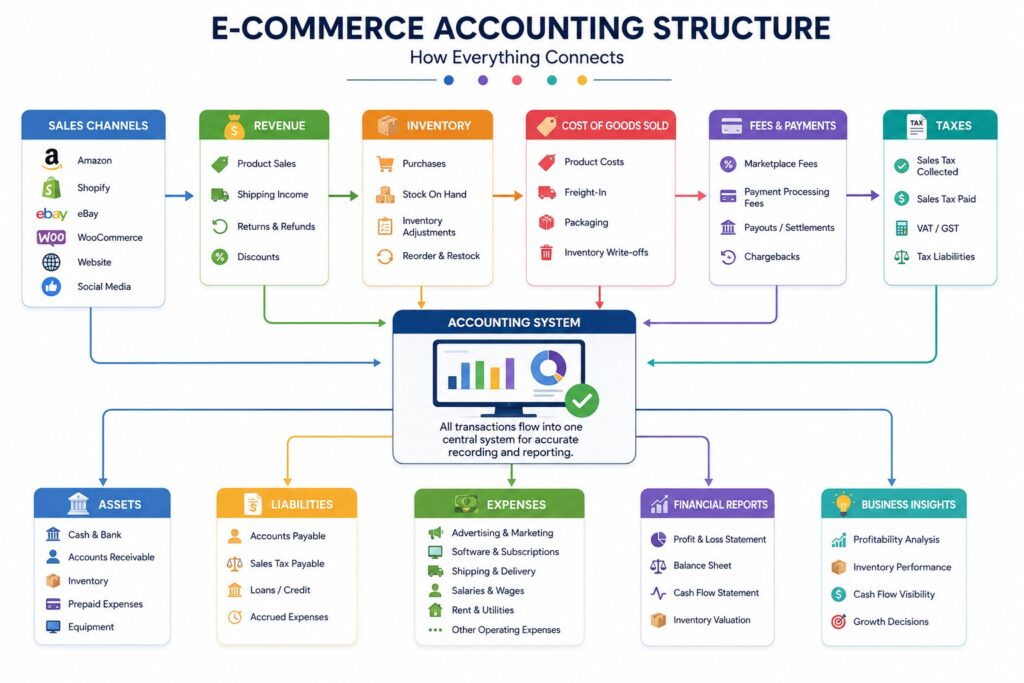
A chart of accounts is simply a list of all the accounts a business uses to record its financial activity. Each account has a name and usually a number to make transactions easier to organize.
For an online store, these accounts may include:
- Revenue: Product sales, shipping income, and other sales
- Assets: Cash, inventory, and marketplace balances
- Liabilities: Sales tax payable, credit cards, and unpaid bills
- COGS: Product costs, freight, and fulfillment costs
- Expenses: Advertising, software, platform fees, and professional services
Why E-commerce Businesses Need a Detailed Structure
A small service business may only need a few basic income and expense accounts. An e-commerce business usually has more moving parts.
Common e-commerce Transactions
An online store may receive money through:
- Shopify
- Amazon
- Walmart
- Stripe
- PayPal
- Other marketplaces
It may also pay for:
- Inventory
- Shipping
- Warehousing
- Advertising
- Marketplace fees
- Payment processing
- Returns and refunds
Keeping these transactions separate makes e-commerce accounting easier to review and helps show where the business is actually making or losing money.
General COA vs. E-commerce COA
A general chart of accounts may work for a simple business, but e-commerce companies often need more detail. The main difference is how closely the accounts track sales channels, inventory, marketplace fees, refunds, and other online selling costs.
| General COA | e-commerce COA |
| One general sales account | Separate Amazon, Shopify, and other sales |
| Basic expense categories | Platform, payment, advertising, and shipping fees |
| Simple inventory tracking | Inventory by location or sales channel |
| General refunds account | Refunds and returns tracked clearly |
| Basic cash accounts | Bank, marketplace, and payment balances |
| Limited COGS detail | Product, freight, and fulfillment costs |
How the Chart of Accounts Connects to Financial Reports
The accounts you create eventually feed into your main financial statements.
- Profit and Loss (P&L): Shows revenue, COGS, expenses, and profit.
- Balance Sheet: Shows assets, liabilities, and owner’s equity.
- Cash Flow: Helps explain how money moves in and out of the business.
A good structure gives business owners a clearer picture of their finances and provides a stronger foundation for accurate reporting as the e-commerce business grows.
Why an Ecommerce Chart of Accounts Matters for Online Stores
An ecommerce chart of accounts helps online stores organize sales, costs, inventory, taxes, and other financial activities. With clear e-commerce accounts, business owners can understand profitability, track cash, prepare taxes, and make better decisions as their business grows.
- See Where Sales Come From: Separate Shopify, Amazon, Walmart, wholesale, and DTC sales to compare revenue and identify your strongest sales channels.
- See What Is Eating Your Profit: Track platform fees, payment processing, advertising, shipping, warehousing, and fulfillment costs to understand what reduces your margins.
- Track Inventory Properly: A chart of accounts for an e-commerce business separates inventory from COGS, helping you track stock value and products sold accurately.
- Make Better Business Decisions: Clear financial records show whether rising sales are increasing profits or whether growing advertising and fulfillment costs are reducing margins.
- Make Tax Preparation Easier: Organized e-commerce accounts make sales tax, marketplace transactions, refunds, and other tax-related amounts easier to identify, reconcile, and report.
The U.S. Census Bureau reported $326.7 billion in seasonally adjusted U.S. retail e-commerce sales in Q1 2026, up 9.8% from Q1 2025. E-commerce represented 16.9% of total retail sales, showing why accurate financial tracking is increasingly important for online retailers.
Ecommerce Chart of Accounts Structure: The 5 Main Account Groups
A good ecommerce chart of accounts gives every financial transaction a clear category, making it easier to understand sales, costs, inventory, and cash. For an online store, the structure should also account for marketplaces, payment platforms, returns, and other costs that may not appear in a traditional chart of accounts for a retail business.
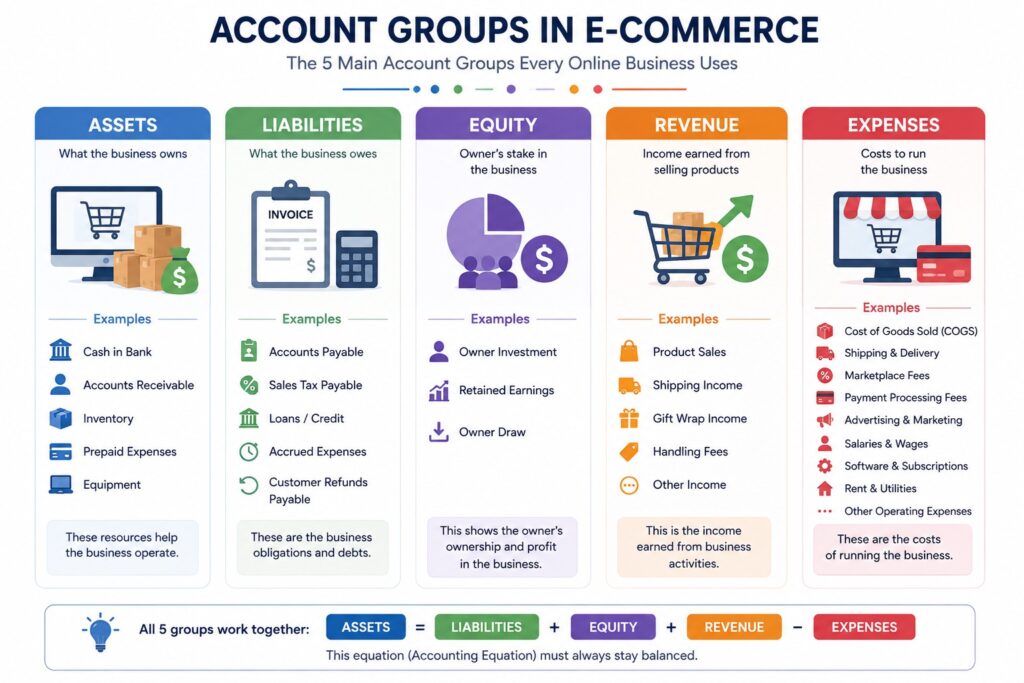
The 5 Main Account Groups
Before building a chart of accounts for an e-commerce company, it helps to understand the five basic account groups. Each group serves a different purpose and appears in a specific part of the financial statements.
| Account Group | What It Means | Common e-commerce Accounts | Financial Statement | Example |
| Assets | Things the business owns or controls | Bank accounts, inventory, Amazon balance, Shopify balance, accounts receivable, inventory in transit | Balance Sheet | $50,000 of inventory held for sale |
| Liabilities | Money the business owes to others | Accounts payable, credit cards, sales tax payable, loans, accrued expenses | Balance Sheet | $5,000 owed to a supplier |
| Equity | The owner’s financial interest in the business | Owner contributions, owner draws, retained earnings | Balance Sheet | Owner invests $20,000 into the business |
| Revenue | Money earned from selling products or services | Amazon sales, Shopify sales, Walmart sales, wholesale sales, shipping income | P&L | $100,000 in product sales |
| Expenses | Costs required to operate the business | Advertising, software, shipping, storage, professional fees, platform fees | P&L | $10,000 spent on advertising |
Contra-Revenue Accounts
E-commerce businesses also need contra-revenue accounts because the amount customers originally pay is not always the final revenue the business keeps. Returns, refunds, discounts, and allowances reduce gross sales and should be tracked separately.
| Contra-Revenue Account | What It Tracks | e-commerce Example | Why Track It Separately? |
| Returns | Products customers send back | Returned Shopify order | Shows the value of products returned |
| Refunds | Money returned to customers | Amazon customer refund | Prevents refunds from being mixed with regular expenses |
| Discounts | Price reductions given to customers | 20% promotional discount | Shows how much revenue was reduced through promotions |
| Allowances | Partial reductions after a sale | Partial refund for damaged goods | Helps track adjustments without changing the original sale |
Key Point for E-commerce Businesses
A chart of accounts for an ecommerce company should provide enough detail to answer important questions without creating hundreds of unnecessary accounts. Compared with a traditional retail chart of accounts, e-commerce businesses often need dedicated accounts for marketplace balances, payment processors, platform fees, advertising, inventory locations, refunds, and fulfillment costs.
Sample Chart of Accounts for E-commerce Business
A sample chart of accounts for an e-commerce business organizes sales, inventory, costs, liabilities, and expenses without creating unnecessary accounts for every transaction.
This sample structure covers the main accounts an online store may need across sales, inventory, liabilities, revenue, COGS, and operating expenses.
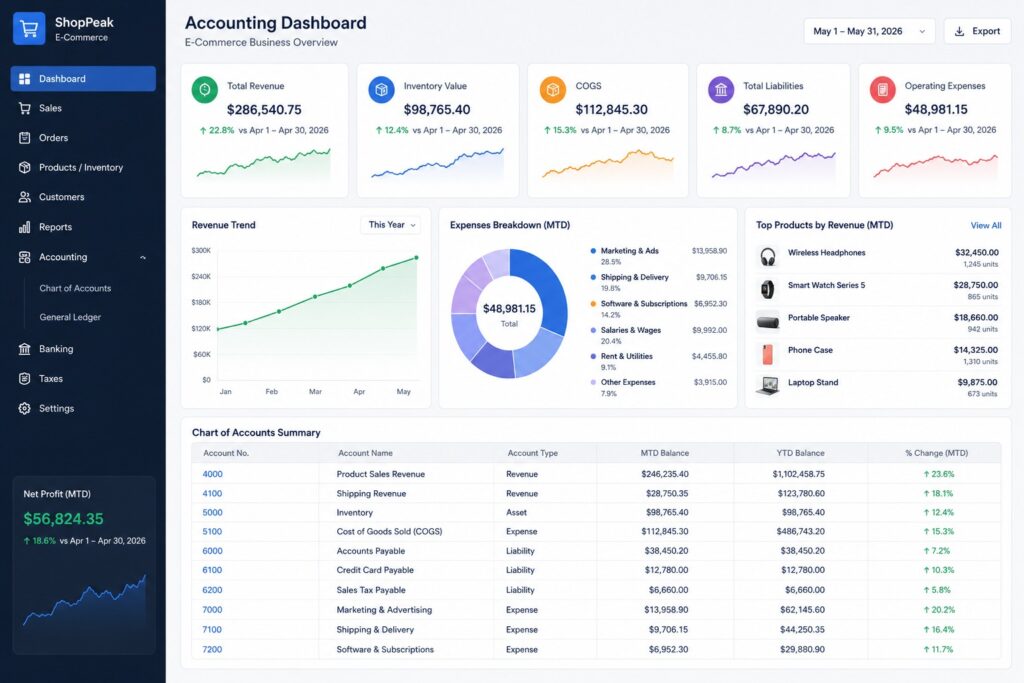
| Account No. | Account Name | Type |
| 1000–1999 | Assets | |
| 1010 | Operating Checking | Asset |
| 1020 | Savings | Asset |
| 1100 | Accounts Receivable | Asset |
| 1200 | Inventory | Asset |
| 1210 | FBA Inventory | Asset |
| 1220 | Warehouse Inventory | Asset |
| 1230 | Inventory in Transit | Asset |
| 1300 | Amazon Payment Balance | Asset |
| 1310 | Shopify Payment Balance | Asset |
| 1320 | Stripe Clearing | Asset |
| 2000–2999 | Liabilities | |
| 2010 | Accounts Payable | Liability |
| 2100 | Credit Cards Payable | Liability |
| 2200 | Sales Tax Payable | Liability |
| 2300 | Accrued Expenses | Liability |
| 3000–3999 | Equity | |
| 3010 | Owner Contributions | Equity |
| 3020 | Owner Draws | Equity |
| 3100 | Retained Earnings | Equity |
| 4000–4999 | Revenue | |
| 4010 | Shopify Product Sales | Revenue |
| 4020 | Amazon Product Sales | Revenue |
| 4030 | Other Marketplace Sales | Revenue |
| 4040 | Wholesale Sales | Revenue |
| 4100 | Shipping Income | Revenue |
| 4500–4599 | Contra-Revenue | |
| 4510 | Refunds & Returns | Contra-Revenue |
| 4520 | Discounts | Contra-Revenue |
| 5000–5999 | COGS | |
| 5010 | Product Cost | COGS |
| 5020 | Freight & Import Costs | COGS |
| 5030 | Fulfillment Costs | COGS |
| 5040 | Inventory Adjustments | COGS |
| 6000–6999 | Operating Expenses | |
| 6010 | Amazon Selling Fees | Expense |
| 6020 | Shopify Fees | Expense |
| 6030 | Payment Processing Fees | Expense |
| 6100 | Advertising | Expense |
| 6110 | Amazon Advertising | Expense |
| 6120 | Meta Advertising | Expense |
| 6130 | Google Advertising | Expense |
| 6200 | Shipping & Delivery | Expense |
| 6300 | Warehousing & Storage | Expense |
| 6400 | Software & Apps | Expense |
| 6500 | Professional Fees | Expense |
| 6600 | Payroll | Expense |
Note: This sample chart of accounts for an e-commerce business is not a universal template. The right accounts depend on your business model, sales channels, inventory system, tax setup, and reporting needs.
How to Build an Ecommerce Chart of Accounts Step by Step
Building an ecommerce chart of accounts starts with understanding how money moves through your business. These steps help create a clear structure that stays useful as operations grow.
- Step 1: List All Sales Channels: Identify every place you sell products, including Shopify, Amazon, Walmart, eBay, your website, and wholesale channels, to create accurate revenue accounts.
- Step 2: List Your Money Accounts: Record bank accounts, payment processors, marketplace balances, and clearing accounts so payouts, deposits, and balances can be matched during reconciliation.
- Step 3: Separate Revenue Sources: Avoid putting every sale into one generic account when channel-level reporting matters. Create separate accounts for major sales channels and revenue sources.
- Step 4: Add Inventory Accounts: Include inventory, FBA inventory, warehouse inventory, and inventory in transit to show where stock is held and support accurate financial reporting.
- Step 5: Separate COGS From Operating Expenses: Keep product costs separate from operating expenses. COGS relates to products sold, while operating expenses cover the broader costs of running your business.
- Step 6: Add e-commerce-Specific Expenses: Create accounts for platform fees, payment processing, advertising, shipping, fulfillment, storage, and software to understand which costs are affecting your margins.
- Step 7: Add Tax-Related Accounts: Include sales tax payable and other applicable tax liability accounts to keep amounts collected or owed separate and easier to reconcile.
- Step 8: Set Naming and Numbering Rules: Use consistent names and numbers across your e-commerce accounts, such as 4000 Revenue, 4010 Shopify Sales, and 4020 Amazon Sales.
- Step 9: Test the Structure: Take one month of transactions and assign each item to an account. Fix unclear categories or missing accounts before using the structure regularly.
- Step 10: Review the COA Regularly: Review your chart of accounts for an e-commerce business periodically and make outdated accounts inactive instead of allowing the account list to grow unnecessarily.
Amazon Seller Chart of Accounts: What Should You Track?
An Amazon seller chart of accounts should separate sales, fees, refunds, inventory, and Amazon balances so marketplace activity can be tracked and reconciled accurately.
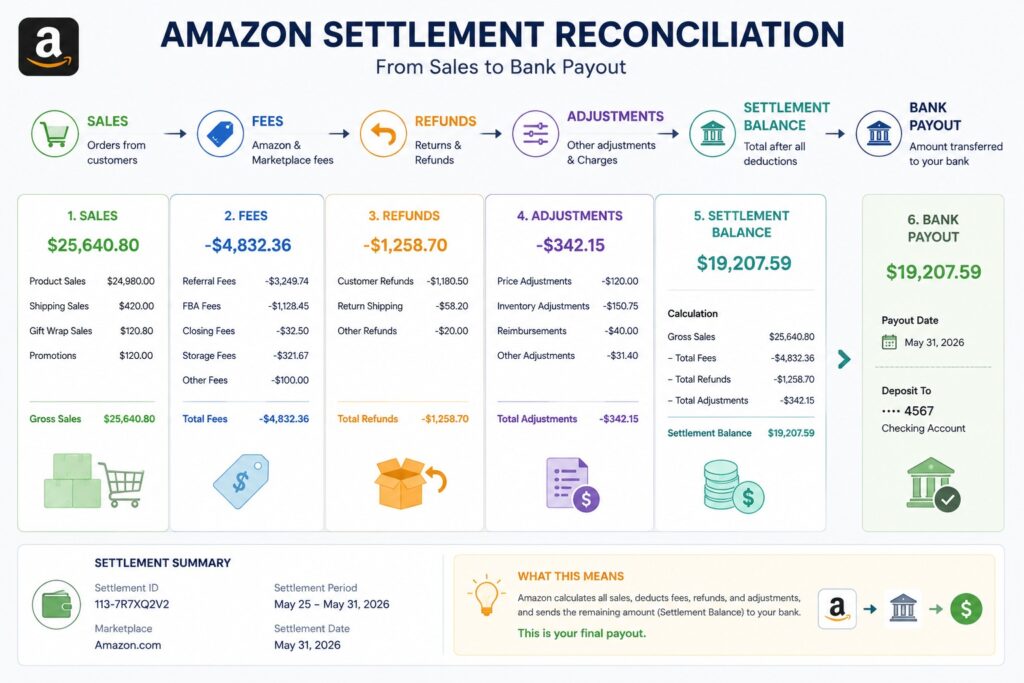
Key Amazon Accounts to Track
- Amazon Sales: Record product revenue generated through Amazon orders.
- Amazon Refunds: Track money returned to customers for refunds and returned orders.
- Amazon Selling Fees: Record referral fees and other charges related to selling on Amazon.
- FBA Fees: Track fulfillment, storage, removal, and other Amazon FBA vs FBM fees.
- Amazon Advertising: Record Sponsored Products, Sponsored Brands, and other Amazon advertising costs.
- Amazon Reimbursements: Track amounts Amazon pays back for eligible claims, lost inventory, damaged goods, or other adjustments.
- FBA Inventory: Track products stored and managed through Amazon’s fulfillment network.
- Amazon Payment Balance: Record money Amazon owes the business before it reaches the bank.
- Amazon Reserves/Deferred Funds: Track amounts Amazon temporarily holds or delays from available payouts.
- Amazon Settlements: Use settlement reports to reconcile sales, fees, refunds, adjustments, and payouts.
Amazon Payout Is Not the Same as Revenue
A common e-commerce accounting mistake is recording the Amazon bank deposit as sales. The payout is the net amount transferred after Amazon deducts fees, refunds, adjustments, and other amounts.
For example:
- Amazon sales: $10,000
- Amazon fees: $1,500
- Refunds: $300
- Other adjustments: $200
- Bank payout: $8,000
The $8,000 bank deposit should not be recorded as $8,000 of sales. The $10,000 sale and each deduction should be recorded in the appropriate accounts, while the final payout should be reconciled against the Amazon balance.
Why Settlement Reconciliation Matters
A properly organized Amazon seller chart of accounts makes it easier to match Amazon settlements with your accounting records. Separating sales, fees, refunds, inventory, deferred funds, payouts, and COGS also gives you a clearer view of actual Amazon profitability.
QuickBooks Chart of Accounts for Amazon FBA
A QuickBooks chart of accounts for Amazon FBA should organize Amazon activity into useful accounts while keeping QuickBooks clean and easy to reconcile.
Accounts to Include
- FBA Inventory: Tracks products stored in Amazon fulfillment centers.
- Amazon Payment Balance: Shows money Amazon owes the business before payout.
- Amazon Sales: Records revenue from Amazon product sales.
- Amazon Refunds: Tracks customer refunds and returns.
- Amazon Selling Fees: Records referral and other Amazon selling fees.
- FBA Fulfillment Fees: Tracks fees for picking, packing, and shipping orders.
- Amazon Advertising: Records Amazon advertising and sponsored product costs.
- Amazon Reimbursements: Tracks reimbursements received from Amazon for eligible claims and adjustments.
- Inventory Adjustments: Records changes from damaged, lost, missing, or corrected inventory.
- COGS: Records the cost of products sold during the period.
Use Clearing Accounts
A clearing account can temporarily hold Amazon settlement activity before the money reaches your bank account. This helps match Amazon settlements with actual bank deposits.
For example:
Amazon settlement -> Amazon clearing account -> Bank deposit
This approach makes it easier to identify differences between the settlement amount and the amount deposited.
QuickBooks should be the accounting record, not simply a dumping ground for every marketplace transaction. Detailed Amazon transaction data can remain in Amazon reports or connected systems, while QuickBooks records the financial information needed for accurate reporting.
Shopify and Multichannel Ecommerce Chart of Accounts
Businesses selling through Shopify, Amazon, Walmart, and other channels need a clear structure to see where sales come from and how much each channel costs. A well-organized ecommerce chart of accounts keeps these transactions separate and makes reconciliation easier.
Revenue Accounts
Create separate revenue accounts for major sales channels so you can compare performance without mixing different sources.
- Shopify Sales
- Amazon Sales
- Walmart Sales
- Wholesale Sales
Fee Accounts
Track selling and payment costs separately to understand how much each channel costs to operate.
- Shopify Fees
- Amazon Fees
- Walmart Fees
- Payment Processing Fees
Clearing Accounts
Clearing accounts help hold payment activity temporarily while you match platform records with bank deposits.
- Shopify Clearing
- Amazon Clearing
- Stripe Clearing
Other Accounts to Consider
A growing chart of accounts for an e-commerce business may also include separate accounts for discounts, shipping income, advertising, storage, inventory, refunds, and fulfillment. The goal is not to create an account for every transaction, but to separate information that helps you understand sales, costs, cash, and profitability.
Ecommerce Chart of Accounts for Inventory and COGS
A clear ecommerce chart of accounts should separate inventory, COGS, fulfillment, landed costs, and inventory adjustments. This helps business owners understand product costs and see how much profit each sale actually generates.
- Inventory: Inventory is money tied up in products that have not yet been sold. It is recorded as an asset until the products are sold, rather than being treated as an immediate expense.
- COGS: Cost of Goods Sold (COGS) represents the cost connected to products that were sold. Tracking COGS correctly helps calculate gross profit and shows the true cost of selling products.
- Landed Costs: Depending on the business, product costs may include the purchase price, freight, import duties, and certain inbound costs. Keeping these costs organized gives a more accurate view of what products actually cost the business.
- Fulfillment: Fulfillment costs may be tracked separately from product costs depending on the accounting and reporting method used. This can include picking, packing, storage, and shipping services provided by a fulfillment company or marketplace.
- Inventory Adjustments: A chart of accounts for an e-commerce business should account for damaged stock, shrinkage, write-offs, and differences found during stock counts. Recording these adjustments keeps inventory values accurate.
Together, these accounts help answer an important question: “How much did this product actually cost me to sell?” A well-organized structure also makes it easier to compare product margins, identify where costs are increasing, and understand how e-commerce financial accuracy raises your business’s valuation.
Sales Tax and Your E-commerce Chart of Accounts
Sales tax can make e-commerce bookkeeping confusing, especially when different marketplaces handle tax collection differently. A clear ecommerce chart of accounts should keep sales revenue and tax liabilities separate.
How to Track Sales Tax
A separate tax structure in your ecommerce chart of accounts helps keep collected tax out of revenue and makes tax reporting and reconciliation easier.
- Sales tax collected is generally a liability: It is usually money collected from customers that may need to be sent to the relevant tax authority, not business revenue.
- Track tax payable separately: Use a dedicated Sales Tax Payable account rather than adding collected tax to sales.
- Amazon may collect sales tax: Marketplace facilitator rules can require Amazon to collect and remit tax on certain transactions.
- Other channels may differ: Shopify, your own website, wholesale sales, and other marketplaces can have different tax collection responsibilities depending on the transaction and location.
- Keep tax separate from revenue: Record product sales and sales tax in separate accounts so revenue reports are not overstated.
- Reconcile tax reports: Compare marketplace and payment platform data with your records, especially around Black Friday and Cyber Monday tax compliance.
1099-K Reporting Threshold
The IRS currently states that third-party settlement organizations generally have a federal Form 1099-K reporting threshold of more than $20,000 and more than 200 transactions. Payment card transactions are subject to different reporting rules.
Importantly, the 1099-K reporting threshold does not mean income below that amount is tax-free. E-commerce income still needs to be reported even if you do not receive a Form 1099-K.
How to Automate an E-commerce Chart of Accounts
As e-commerce businesses scale past 7 figures, manual bookkeeping breaks down fast. Many turn to outsourced bookkeeping services to keep sales, fees, inventory, and payouts organized while automation handles the repetitive work.
- Step 1: Connect Sales Platforms: Connect Shopify, Amazon, payment processors, and other sales platforms so transaction data flows into your ecommerce chart of accounts automatically.
- Step 2: Map Transactions to Accounts: Assign each transaction to the right account, such as Shopify sales to Shopify Sales, fees to Shopify Fees, refunds to Refunds, and taxes to Sales Tax Payable.
- Step 3: Use Clearing Accounts: Use clearing accounts to temporarily hold platform transactions, making your chart of accounts for an e-commerce business easier to reconcile with actual bank deposits.
- Step 4: Automate Reconciliation: Set the system to compare platform reports with accounting records and bank deposits, helping identify missing, duplicate, or mismatched transactions.
- Step 5: Automate Recurring Classifications: Create rules for repeated transactions such as software subscriptions, advertising platforms, payment fees, and other regular e-commerce accounts.
- Step 6: Review Exceptions Manually: Automation should reduce repetitive work, not remove financial review. Check unusual transactions, mismatches, and exceptions before finalizing your ecommerce chart of accounts.
How to Optimize Your E-commerce Chart of Accounts
Knowing how to optimize your chart of accounts helps you keep financial records simple, useful, and aligned with the way your e-commerce business actually operates.
- Step 1: Remove Duplicate Accounts: Check for duplicate or overlapping accounts and remove unnecessary ones so the same type of transaction is not recorded in multiple places.
- Step 2: Combine Unnecessary Accounts: Combine accounts that do not need separate reporting. Keep separate accounts only when the information helps you understand costs, revenue, or performance.
- Step 3: Separate Important Sales Channels: Keep Shopify, Amazon, Walmart, wholesale, or other channels separate when channel-level reporting helps you compare sales and profitability.
- Step 4: Keep COGS Clear: Separate product costs from operating expenses so you can clearly see gross profit and understand the costs directly connected to products sold.
- Step 5: Keep Tax Liabilities Separate: Use dedicated accounts for sales tax payable and other applicable tax liabilities instead of mixing taxes with revenue or regular expenses.
- Step 6: Use Consistent Naming: Use simple, consistent account names and numbering throughout your ecommerce chart of accounts, and avoid creating accounts for every tiny transaction.
- Step 7: Review and Align Regularly: Review your COA at least annually and align it with management reports so your financial statements provide the information needed for business decisions.
How GATP Solutions Helps E-commerce Businesses Manage Their Chart of Accounts
As an e-commerce business grows, managing sales, inventory, COGS, fees, taxes, and payouts across multiple channels can make bookkeeping harder to manage. A clear ecommerce chart of accounts helps keep these financial details organized and useful.
GATP Solutions provides accounting support for growing Shopify, Amazon, and DTC brands. Its services include e-commerce accounting, multi-channel reconciliation, inventory accounting, and sales tax support, helping businesses keep financial records accurate as operations grow. Explore AI-powered accounting services for 7-figure businesses to see how GATP can support your growing business.
If managing your e-commerce accounts is taking time away from running your business, the right accounting support can help keep your books organized, improve financial visibility, and support better business decisions.
Final Thoughts
An ecommerce chart of accounts is the foundation of clean and useful e-commerce books. It should reflect your sales channels, keep inventory and COGS properly recorded, and make marketplace payouts easier to reconcile. As transaction volume grows, automation can reduce repetitive work and improve accuracy. Growing e-commerce businesses should also review their accounting structure regularly to make sure it still supports current operations and reporting needs.
Whether you sell through Shopify, Amazon, DTC channels, or multiple marketplaces, a clear accounting structure helps you understand sales, costs, inventory, and profitability. GATP Solutions provides AI-powered bookkeeping, accounting, payroll, tax, and Virtual CFO services for growing 7-figure businesses.
Need expert support? Contact GATP Solutions for a free consultation and get the accounting support you need as your e-commerce business grows.
FAQs
What is a chart of accounts for an online store?
An ecommerce chart of accounts organizes an online store’s sales, inventory, fees, taxes, assets, liabilities, and expenses into clear categories for accurate bookkeeping and financial reporting.
What is a chart of accounts in accounting?
A chart of accounts in accounting is a structured list of accounts a business uses to classify transactions, organize financial records, and prepare useful financial statements for management decisions.
How to make a chart of accounts?
To make a chart of accounts, identify business activities, list accounts, group them by type, assign numbers, create subaccounts, map transactions, and review the structure regularly for accuracy.
How to optimize chart of accounts?
To optimize a chart of accounts, remove duplicate accounts, combine unnecessary categories, separate important channels, keep COGS and tax accounts clear, and align reporting needs with business goals.
How to set up a chart of accounts?
To set up a chart of accounts, create parent accounts, add useful subaccounts, assign consistent numbers, define naming rules, and map transactions to appropriate accounts for accurate reporting.
What is the purpose of the chart of accounts?
The purpose of a chart of accounts is to categorize financial transactions consistently, making revenue, expenses, assets, liabilities, inventory, and profitability easier to track and report accurately.
Why is a chart of accounts important?
A chart of accounts is important because organized records improve business decisions, tax preparation, cash flow visibility, profitability analysis, and financial reporting as an e-commerce business grows.