Key Takeaways
- A virtual accountant is an accountant who keeps your books, closes your month and prepares your tax filings remotely, using cloud software and secure portals.
- A median in-house accountant costs $123,919 a year once benefits are added. That figure uses BLS wage data for May 2025 and compensation data for June 2026.
- GATP’s fixed-fee virtual accounting plans start at less than $250 a month, per its published pricing page.
- Only CPAs, enrolled agents and attorneys hold unlimited rights to represent you before the IRS, so check the credential before you sign.
- Federal rules require tax and accounting firms to keep a written information security plan and use multi-factor authentication on client data.
- Form 1099-NEC reporting starts at $2,000 for tax years beginning after 2025, up from the $600 limit that applied through 2025.
A virtual accountant is an accountant who handles your accounting remotely, through cloud software, secure portals and video calls. The work matches an in-office accountant’s: bookkeeping, reconciliations, financial statements, payroll records and tax filings. Only the delivery changes.
Most owners look for virtual accountant services when the books start running late. Statements arrive weeks after month end. Tax season turns into a scramble for receipts. A full-time hire looks expensive for the hours the work actually takes.
When the questions move from records to forecasts, the same remote model extends to a Virtual CFO. This guide covers what a virtual accountant does and how the work runs week to week. It also covers what it costs in 2026 and how to choose one safely.

What Does a Virtual Accountant Do?
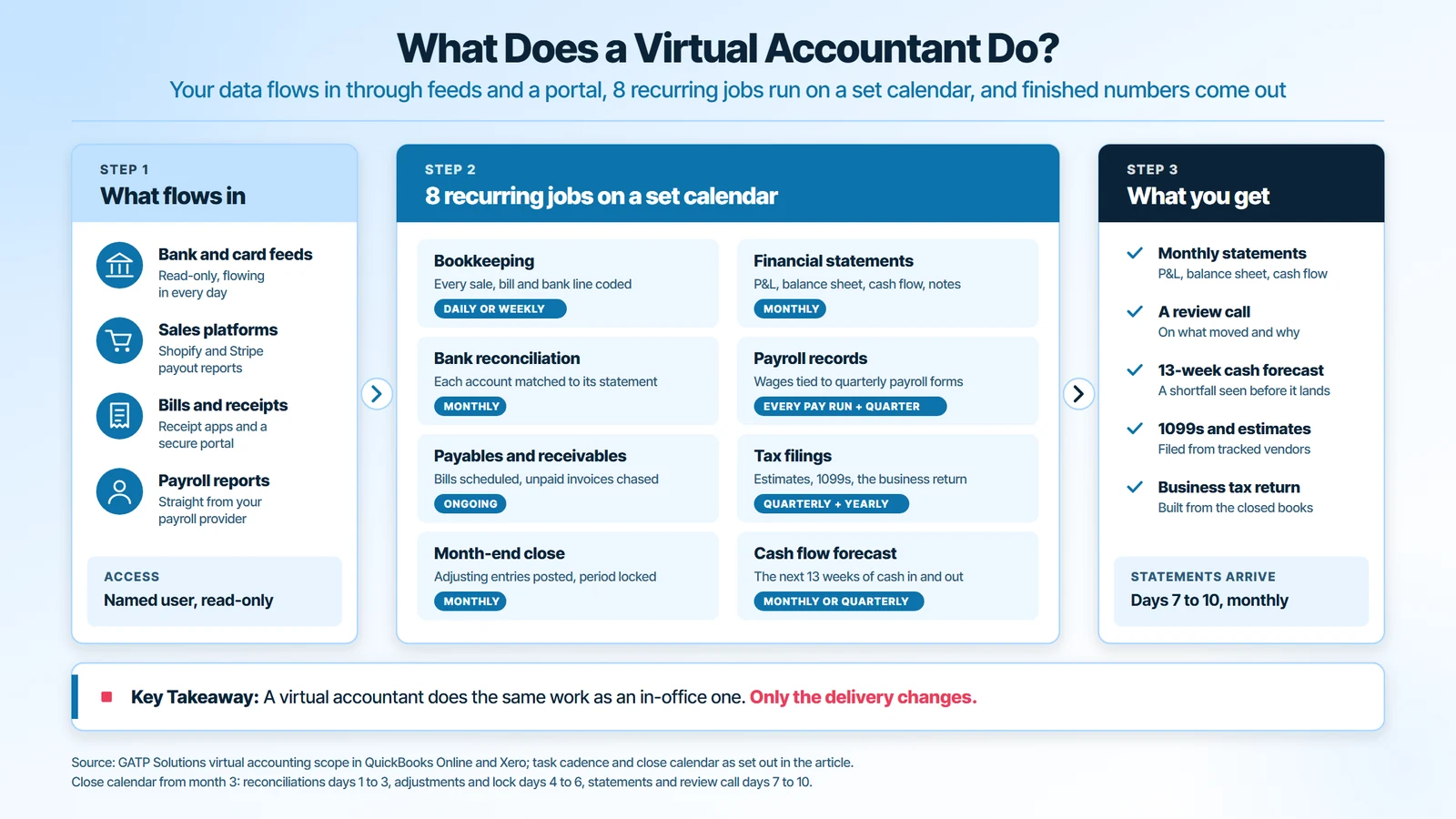
A virtual accountant is a remote accountant who records, reconciles and reports your business finances, then turns them into tax filings and decisions. The tasks follow a calendar. Some happen every month, some every quarter and some once a year.
Here is the work, grouped by when it happens:
- Bookkeeping (daily or weekly): every sale, bill and bank transaction is coded to the right account in QuickBooks Online or Xero.
- Bank reconciliation (monthly): each bank and credit card account is matched to its statement, so the books show real cash.
- Accounts payable and accounts receivable (ongoing): bills are scheduled for payment and unpaid customer invoices are chased.
- Month-end close (monthly): adjusting entries are posted and the period is locked against later edits.
- Financial statements (monthly): a profit and loss statement, a balance sheet and a cash flow statement, with notes on what moved.
- Payroll records (every pay run and quarter): wages and payroll taxes are recorded and tied to the quarterly payroll forms.
- Tax filings (quarterly and yearly): estimated taxes, 1099 forms and the business return are prepared from the closed books.
- Cash flow forecast (monthly or quarterly): the next 13 weeks of cash in and out, so you see a shortfall before it arrives.
A simple example shows the order. An online store connects its bank feeds and sales platform to the accounting file. The virtual accountant codes the transactions, reconciles the accounts, closes the month and sends statements with a short note on margin. At year end, the same closed books produce the return.
Virtual Accountant vs Virtual Bookkeeper: Where the Work Splits
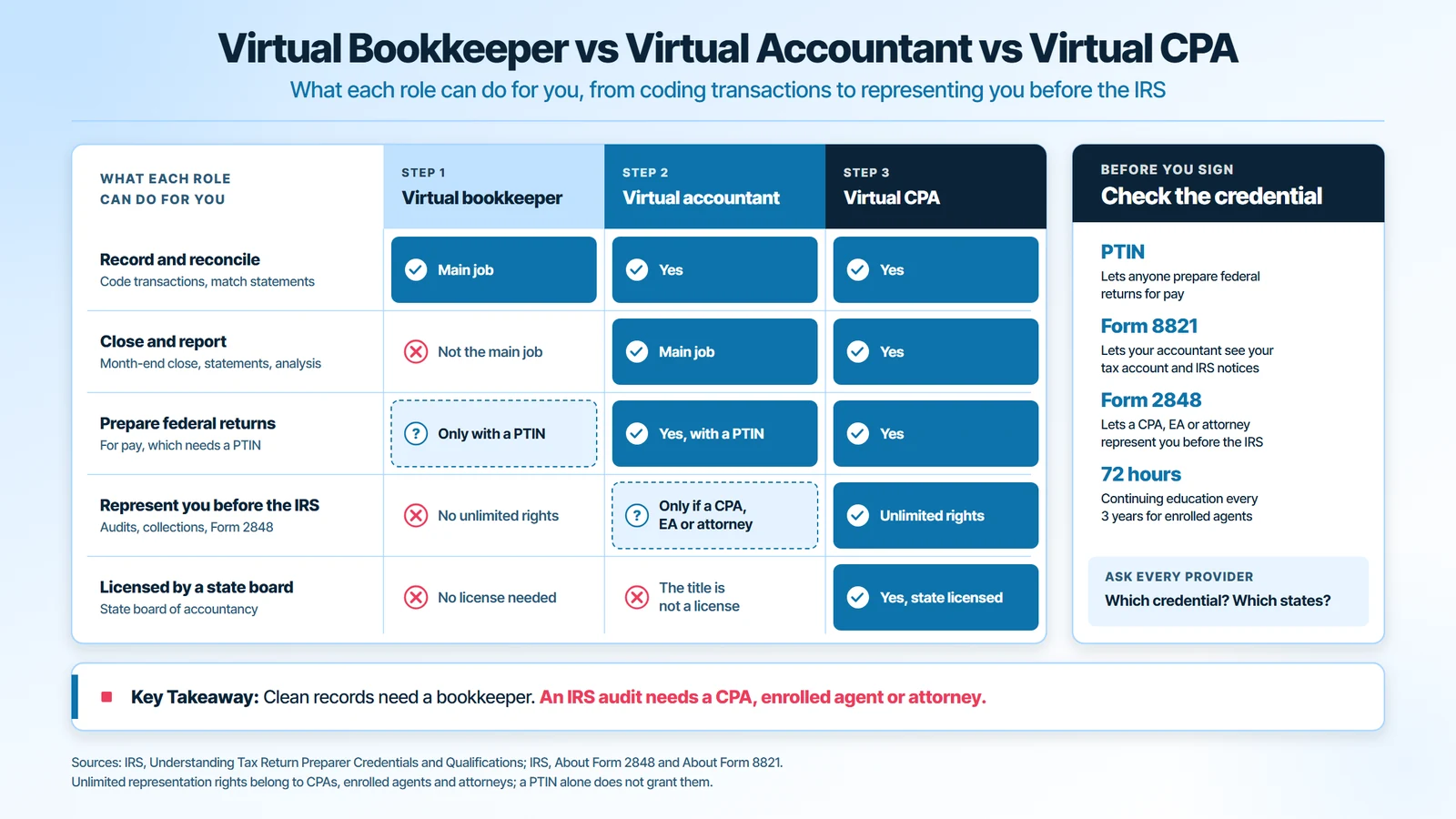
A virtual bookkeeper records and reconciles transactions, while a virtual accountant interprets those records, prepares statements and handles tax work. Many firms sell both in one plan. The difference matters when you need advice or IRS representation, not just clean records.
| Role | Main work | Can prepare federal returns | Can represent you before the IRS |
|---|---|---|---|
| Virtual bookkeeper | Recording, coding, reconciling | Only with a PTIN | No unlimited rights |
| Virtual accountant | Close, statements, analysis, tax work | Yes, with a PTIN | Only if a CPA, enrolled agent or attorney |
| Virtual CPA | All of the above, state licensed | Yes | Yes, unlimited rights |
The title “accountant” is not a license. A PTIN lets a professional prepare federal returns for pay. Representation in an audit or a collection case needs one of the three credentials in the last column.
What Are Virtual Accounting Services?
Virtual accounting services are accounting and bookkeeping work delivered remotely, as a recurring plan instead of an in-office hire. The accounting is the same. “Virtual” describes how it reaches you: shared cloud files, a document portal and scheduled calls.
What you actually buy is a scope and a rhythm. A typical plan sets out:
- Frequency: how often the books are updated, from daily to monthly.
- Close date: the working day each month’s statements are delivered.
- Meetings: a weekly call, a monthly call or recorded video notes.
- Channels: email only, or messaging tools such as Slack, Zoom and WhatsApp.
- Add-ons: payroll, bill payment, collections, tax filing and CFO time.
GATP’s published plans start at less than $250 a month and show how those levers combine. Lite updates the books monthly with email support and recorded video notes. Plus updates them weekly with a monthly call. Premium updates them daily, adds a weekly call, a monthly CFO session and federal and state tax filing.
| Point of difference | Traditional accounting | Virtual accounting |
|---|---|---|
| Where the work happens | Your office or a local firm | A shared cloud accounting file |
| How documents move | Paper, email attachments, drop-offs | Bank feeds, receipt apps, a secure portal |
| When you see numbers | Quarterly or at tax time | Monthly statements and a live dashboard |
| How you pay | Salary or hourly billing | Fixed monthly fee by scope |
| Who you can hire | Firms within driving distance | Specialists in your industry, anywhere |
How Does a Virtual Accountant Work With You?
A virtual accountant works with you through shared access to your accounting file, your bank feeds and, for tax work, an IRS authorization. The first 90 days follow a set order. Each step exists to stop a specific problem later.

Weeks 1 and 2: Access, Documents and IRS Authorization
Setup is mostly permissions. Nobody should ever ask for your bank password.
- Invite the accountant as a user in QuickBooks Online or Xero. A named user leaves an audit trail. A shared login does not.
- Connect read-only bank and card feeds. Transactions flow in daily, so nothing depends on monthly statement emails.
- Upload the document set: last year’s return, loan statements, payroll reports and open vendor contracts. Missing loan schedules are the usual cause of a wrong balance sheet.
- Sign the IRS authorization. Form 8821 lets the accountant see your tax account and notices. Form 2848 goes further and lets an eligible professional represent you.
Both forms can be signed electronically and submitted to the IRS online. Without one, a penalty notice sits in your mailbox until someone opens it.
Weeks 3 to 6: Catch-Up and Opening Balances
Before any month can close, the opening balances have to be right. Months that were never reconciled get caught up first. Then the accountant ties each balance to an outside document:
- Cash: every bank and card account to its statement for the opening month.
- Loans: each balance to the lender’s statement, with interest split from principal.
- Payroll liabilities: unpaid payroll taxes to the payroll provider’s reports.
- Owner equity: contributions and draws to last year’s return.
Each tie-out stops a different error. An untied loan overstates expenses, because principal gets booked as interest. Untied payroll liabilities hide a missed tax deposit.
This stage also fixes the chart of accounts. A common change is splitting one “expenses” account into cost of sales and operating costs. Without that split, gross margin cannot be read from the statements.
Month 3 Onward: The Monthly Close Calendar
From the third month, the work settles into a fixed calendar:
- Days 1 to 3: bank and card reconciliations, payroll entries recorded.
- Days 4 to 6: accruals, prepaid expenses and depreciation posted, the period locked.
- Days 7 to 10: financial statements delivered, then a review call on what changed.
Automation now does most of the coding, and the accountant reviews the exceptions. In one GATP engagement with a consulting and staff budgeting firm, automated categorization flagged payroll anomalies and 1099 issues before filing. A senior reviewer cleared duplicate vendors, and a 90-day rolling cash forecast was added.
The result was a 65% faster month-end close, from 20 days to 7 days, and 70% fewer 1099 corrections. The software did the sorting. The judgment on what to fix stayed with a person.
How Much Does an Online Accountant Cost?
An online accountant on a fixed plan costs from less than $250 a month for monthly bookkeeping, on GATP’s published pricing, rising with scope. A median in-house accountant costs $10,327 a month once benefits are added. The gap is the reason most owners compare the two.
Online accountants charge in 3 ways:
- Fixed monthly fee: the most common model for ongoing work. The fee follows transaction volume, accounts reconciled, payroll and how often you meet.
- Hourly billing: used for one-off advice and cleanup projects. It makes every question a cost, so owners ask fewer.
- Project fee: a set price for a defined job, such as a year of catch-up books or one business return.
Five things move a monthly quote. They are the number of transactions, the number of bank and card accounts, entities, payroll and how far behind the books are. Ask for the scope in writing, with the close date and meeting cadence listed.
Virtual Accountant vs In-House Accountant: The 2026 Cost Math
The Bureau of Labor Statistics wage survey put the median accountant’s pay at $83,680 a year, or $40.23 an hour, in May 2025. Benefits sit on top. BLS employer cost data for June 2026 show $88.63 in total compensation for every $59.85 of wages in business and financial jobs.
Scaling the median wage by that ratio gives the real cost of one employee:
| Cost line | Median in-house accountant | Virtual accountant on a plan |
|---|---|---|
| Annual cost with benefits | $123,919 | The plan fee times 12 |
| Monthly cost | $10,327 | From less than $250 |
| Hourly cost | $59.58 | Built into the fixed fee |
| Cover for leave or turnover | None, work stops | A team covers the file |
The comparison is not like for like at every size. A plan at the entry price covers monthly bookkeeping, not a full-time controller. Still, a full-time hire means paying for 173 hours a month. Most businesses doing $1 million to $10 million need far fewer accounting hours than that.

Is Your Financial Data Safe With a Virtual Accountant?
Your financial data is safe with a virtual accountant when the firm follows the security rules federal law already sets for tax and accounting practices. Those rules are specific, so you can check them in one conversation.
The FTC Safeguards Rule names tax preparation firms as covered financial institutions. It requires a written security program and multi-factor authentication for anyone who accesses customer information. A breach affecting at least 500 consumers must be reported to the FTC within 30 days of discovery.
The IRS guide for practices, Publication 5708, states that the law requires a written information security plan. Ask any provider these questions before you share a login:
- Do you have a written information security plan, and who owns it?
- Is multi-factor authentication on for every staff account that touches my data?
- Do staff use named user accounts in my accounting file, never a shared login?
- Where are my documents stored, and how is access removed when someone leaves?
- How long do you keep my records after we stop working together?
The last answer should match IRS retention rules. The IRS record-keeping guidance sets 4 years for employment tax records and 7 years for a bad debt claim. A firm that deletes files on exit leaves you exposed in an audit.

How to Choose a Virtual Accountant
Choosing a virtual accountant comes down to five checks: credential, industry fit, software, scope and security. Run them before you hire a virtual accountant, not after the first missed deadline. A cheap plan that misses the new 2026 Form 1099-NEC threshold costs more than it saves.
- Check the credential. The IRS explains preparer credentials plainly: anyone with a PTIN may prepare federal returns. CPAs, enrolled agents and attorneys have unlimited representation rights. Enrolled agents complete 72 hours of continuing education every 3 years.
- Ask about your industry. A medical practice, a property portfolio and an online store each need a different chart of accounts. Ask for a client example in your field.
- Confirm the software. Your accountant should work in your system, usually QuickBooks Online or Xero. Switching software just to fit the provider adds cost.
- Get the scope in writing. List the close date, statements delivered, meeting cadence and what costs extra.
- Test the security answers. Use the five questions in the section above.
One red flag ends the search early. If a provider asks for your online banking password, walk away. Read-only feeds and named users make passwords unnecessary.
Pros and Cons of Hiring a Virtual Accountant
Hiring a virtual accountant trades a fixed salary for a scoped plan and a team. The trade suits most growing businesses, but not every one.
The advantages:
- Lower cost: you pay for the hours your books need, not a $123,919 salary and benefits package.
- Depth: a team brings tax, payroll and industry experience one hire rarely has.
- Continuity: work continues through vacations, sick days and resignations.
- Faster numbers: a set close calendar replaces year-end catch-up.
The drawbacks, and how to handle them:
- No one in the building: cash counts and inventory checks need a person on site, so keep one internal owner for them.
- Time zones: fix a weekly meeting slot and a response time in the agreement.
- Dependence on access: keep admin rights to your own accounting file and bank feeds.
Before you commit to virtual accountant services, mark which drawbacks apply to you. Most are solved by the agreement, not by the provider.
Virtual Accountant for Small Business: Three Industry Examples
A virtual accountant for small business adapts the same monthly cycle to the way each industry earns money. Three examples show what changes.
- Ecommerce: Shopify and Stripe pay out net of fees and refunds, so a $10,000 payout is never $10,000 of sales. The accountant records gross sales, fees and refunds separately, then matches each payout to the bank deposit. Without that, revenue is understated and fees disappear.
- Real estate: a rent roll lists what each unit should pay. The accountant matches it to deposits each month and maps repairs, taxes and insurance to each property. Owners then see income by building, not one blended number.
- Medical practices: insurance payments arrive weeks after the visit. The accountant tracks them against billed amounts and ties payroll to provider schedules. That shows which payers pay late and which providers carry the practice.
In each case the remote model works because the source data is already digital. Payout reports, rent rolls and insurance remittances all download from a portal.
What Changed for Virtual Accountants in 2026
Several 2026 rule changes alter what your accountant tracks during the year:
- Form 1099-NEC threshold: reporting starts at $2,000 for tax years beginning after 2025, up from $600, per the 2026 instructions for Forms 1099-MISC and 1099-NEC. Vendor tracking needs the new limit.
- Form 1099-K: payment apps and marketplaces report only payments over $20,000 in more than 200 transactions, under the IRS Form 1099-K rules. Your books, not the form, must capture every sale.
- Cash method test: for tax years beginning in 2026, the Section 448(c) gross receipts test is $32,000,000, set by Rev. Proc. 2025-32.
- Accounting software for firms: Intuit is moving accounting firms from QuickBooks Online Accountant to Intuit Accountant Suite. After the switch, confirm your accountant still has named-user access to your file.
Conclusion: Is a Virtual Accountant Right for Your Business in 2026?
A virtual accountant is right for most businesses whose books run late and whose accounting needs fall short of a full-time hire. Check three things before you sign: the credential, the written security plan and a scope with a fixed close date.
Want to know what a virtual accountant would change in your books? GATP’s CPAs will review your last month-end close, your bank reconciliations and your 1099 vendor list in a 30-minute call. You get the gaps we find and a plan scope sized to your transaction volume.
Frequently Asked Questions About Virtual Accountants
Can a Virtual Accountant File My Business Taxes?
Yes, a virtual accountant with a PTIN can prepare and file your federal business return electronically. A virtual tax accountant who is also a CPA or enrolled agent can represent you if the IRS follows up. Check that state returns are in scope too, since many plans price them separately.
Does a Virtual Accountant Need to Be in My State?
No, a virtual accountant does not need to live in your state to do your books or federal return. CPAs are licensed by state boards of accountancy, so ask which states your accountant is licensed in. For multi-state sales or payroll, confirm they already file in those states.
What Documents Does a Virtual Accountant Need to Start?
A virtual accountant needs access to your accounting file, read-only bank and card feeds, last year’s tax return and your payroll reports. Add loan statements, lease agreements and any open IRS or state notices. With these, the opening balances can be tied out in the first weeks.
What Software Does a Virtual Accountant Use?
Most virtual accountants work in QuickBooks Online or Xero, plus a secure document portal and a video tool. Receipt capture apps and bank feeds fill the file automatically. GATP works in both QuickBooks Online and Xero, so most clients keep their existing system.
Can a Virtual Accountant Handle Payroll?
Yes, most virtual accountants either run payroll or record it from your payroll provider. Either way, the books should tie wages and payroll taxes to the quarterly payroll forms. Keep employment tax records for at least 4 years after the tax is due or paid, per IRS guidance.
How Long Does It Take to Switch to a Virtual Accountant?
Switching to a virtual accountant usually takes 60 to 90 days to reach a steady monthly close. The first two weeks cover access and documents. The next month covers catch-up and opening balances. By the third month, statements should arrive on a fixed date.